# Intended Use and Models

## Intended use

The WLAN Pi product is a wireless networking device intended for use by qualified individuals in controlled educational, laboratory, or testing environments. It is specifically designed for incidental wireless network testing and analysis, with a primary focus on Rx operations. This device is not authorized for permanent installations, continuous transmission, or commercial deployments.

Users are solely responsible for ensuring that their use of the WLAN Pi complies with all applicable local, national, and international laws. Any use outside the specified intended purpose is strictly prohibited and may result in regulatory or legal consequences.

The WLAN Pi development team and its affiliates disclaim all liability for any unauthorized, improper, or unlawful use of the device. By using this device, users agree to these terms and accept full responsibility for its use.

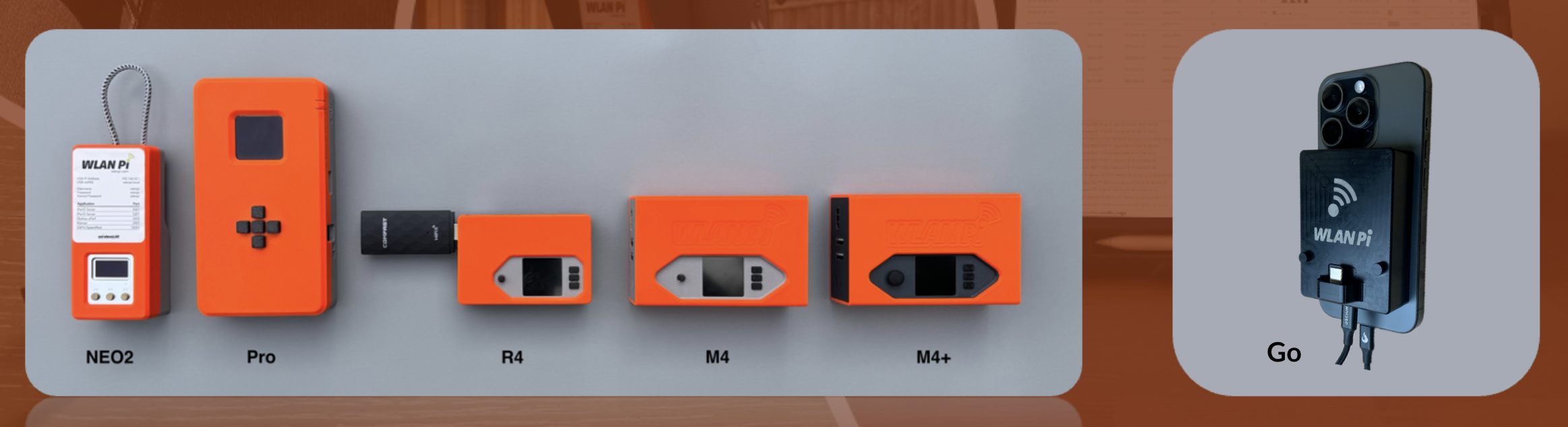
## Compare WLAN Pi models

<figure><img src="https://2540947589-files.gitbook.io/~/files/v0/b/gitbook-x-prod.appspot.com/o/spaces%2FY3fri1fsWlS5euhAG0JN%2Fuploads%2FF8KFS3ViCWwSh9DemRdt%2Fimage.png?alt=media&#x26;token=ec7085b7-95f8-4b3d-849b-de8f374538dd" alt=""><figcaption><p>WLAN Pi NEO2, Pro, R4, M4, M4+, Go</p></figcaption></figure>

<table><thead><tr><th width="226">Feature</th><th width="90.2578125" data-type="checkbox">NEO2</th><th width="89.65625" data-type="checkbox">Pro</th><th width="90.28515625" data-type="checkbox">R4</th><th width="90.484375" data-type="checkbox">M4</th><th width="89.5234375" data-type="checkbox">M4+</th><th width="89.640625" data-type="checkbox">Go</th></tr></thead><tbody><tr><td>Wi-Fi 5</td><td>true</td><td>true</td><td>true</td><td>true</td><td>true</td><td>true</td></tr><tr><td>Wi-Fi 6</td><td>false</td><td>true</td><td>false</td><td>true</td><td>true</td><td>true</td></tr><tr><td>Wi-Fi 6E</td><td>false</td><td>true</td><td>false</td><td>true</td><td>true</td><td>true</td></tr><tr><td>Wi-Fi 6/6E<br>(with USB adapter)</td><td>true</td><td>true</td><td>true</td><td>true</td><td>true</td><td>false</td></tr><tr><td>Wi-Fi 7<br>(with M.2 upgrade kit)</td><td>false</td><td>false</td><td>false</td><td>true</td><td>false</td><td>false</td></tr><tr><td>Wi-Fi 7 native support</td><td>false</td><td>false</td><td>false</td><td>false</td><td>true</td><td>true</td></tr><tr><td>Upgradeable Wi-Fi adapter using M.2 slot*</td><td>false</td><td>true</td><td>false</td><td>true</td><td>true</td><td>true</td></tr><tr><td>Display, buttons and menu system</td><td>true</td><td>true</td><td>true</td><td>true</td><td>true</td><td>false</td></tr><tr><td>Built-in battery</td><td>false</td><td>true</td><td>false</td><td>false</td><td>false</td><td>false</td></tr><tr><td>Can be powered by PoE without accessories</td><td>false</td><td>true</td><td>false</td><td>true</td><td>true</td><td>false</td></tr><tr><td>Indication of PoE power input by LED</td><td>false</td><td>true</td><td>false</td><td>false</td><td>false</td><td>false</td></tr><tr><td>2.4 GHz or 5 GHz spectrum analysis with Wi-Fi Explorer Pro and Metageek Wi-Spy dBx</td><td>false</td><td>true</td><td>true</td><td>true</td><td>true</td><td>true</td></tr><tr><td>2.4 GHz or 5 GHz or 6 GHz spectrum analysis with Wi-Fi Explorer Pro and Oscium WiPry Clarity</td><td>false</td><td>true</td><td>true</td><td>true</td><td>true</td><td>true</td></tr><tr><td>Bluetooth IP connection between WLAN Pi and smartphone</td><td>false</td><td>true</td><td>true</td><td>true</td><td>true</td><td>false</td></tr><tr><td>USB IP connection between WLAN Pi and laptop/iPad</td><td>true</td><td>true</td><td>true</td><td>false</td><td>true</td><td>true</td></tr><tr><td>iPhone cellular internet sharing with WLAN Pi using USB to Lightning cable</td><td>false</td><td>true</td><td>true</td><td>true</td><td>true</td><td>false</td></tr><tr><td>Web UI</td><td>true</td><td>true</td><td>true</td><td>true</td><td>true</td><td>true</td></tr><tr><td>Profiler</td><td>true</td><td>true</td><td>true</td><td>true</td><td>true</td><td>true</td></tr><tr><td>Hotspot mode</td><td>true</td><td>true</td><td>true</td><td>true</td><td>true</td><td>false</td></tr><tr><td>Wi-Fi console mode</td><td>true</td><td>true</td><td>true</td><td>true</td><td>true</td><td>false</td></tr><tr><td>Server mode</td><td>false</td><td>true</td><td>true</td><td>true</td><td>true</td><td>false</td></tr><tr><td>Bridge mode (cellular router with internet provided by smartphone, or wired/wireless bridge)</td><td>false</td><td>true</td><td>true</td><td>true</td><td>true</td><td>false</td></tr><tr><td>USB 3.0</td><td>false</td><td>true</td><td>true</td><td>false</td><td>false</td><td>false</td></tr><tr><td>M3 optional accessory mounts</td><td>false</td><td>true</td><td>false</td><td>true</td><td>true</td><td>false</td></tr><tr><td>M2.5 optional accessory mounts</td><td>false</td><td>false</td><td>true</td><td>false</td><td>false</td><td>false</td></tr><tr><td>Built-in 1/4" thread for tripod mounting</td><td>false</td><td>true</td><td>false</td><td>true</td><td>true</td><td>false</td></tr></tbody></table>

\*Replacing the original Wi-Fi adapter has FCC and other compliance implications. The user takes full responsibility for any hardware modifications.&#x20;

## WLAN Pi OS compatibility

The first version of WLAN Pi OS to support respective WLAN Pi hardware models:

| WLAN Pi Pro | WLAN Pi R4 | WLAN Pi M4 | WLAN Pi M4+ |
| ----------- | ---------- | ---------- | ----------- |
| 3.0.0       | 3.1.1      | 3.1.1      | 3.2.2       |

Download the latest WLAN Pi OS release [from our GitHub](https://github.com/WLAN-Pi/pi-gen/releases/latest).

## NEO2 software compatibility

Please note that NEO2 only supports software images 2.x.x. Newer images 3.x.x software is not compatible with NEO2.

Download the[ latest NEO2 image](https://github.com/WLAN-Pi/neo2/releases) from our Github.


---

# Agent Instructions: Querying This Documentation

If you need additional information that is not directly available in this page, you can query the documentation dynamically by asking a question.

Perform an HTTP GET request on the current page URL with the `ask` query parameter:

```
GET https://userguide.wlanpi.com/hardware/readme.md?ask=<question>
```

The question should be specific, self-contained, and written in natural language.
The response will contain a direct answer to the question and relevant excerpts and sources from the documentation.

Use this mechanism when the answer is not explicitly present in the current page, you need clarification or additional context, or you want to retrieve related documentation sections.
